" transform="translate(5.5 5.5)" width="24.999966829427084px"/></svg>)

Exploring Inconsistencies To Provide Component Guidelines
TIMELINE
May - June 2026
ROLE
Product Designer Intern
STATUS
Handed Off
TEAM
3 Product Designer Interns
2 Senior Product Designers
TOOLS
Figma
Figma Make
Box
Slack
Copilot
Mural
Maze
TIMELINE
May - June 2026
STATUS
Handed Off
TOOLS
Figma
Figma Make
Box
Slack
Copilot
Mural
Maze
ROLE
Product Designer Intern
TEAM
3 Product Designer Interns
2 Senior Product Designers
OVERVIEW
As Cloudability moved onto IBM’s Carbon, the two systems drifted apart across the product. I found where, and wrote the guidance to close it.
Our team of 3 interns audited 700+ component instances and updated 2 components with guidelines Carbon didn’t cover.
CONTEXT
Two teams, two answers, same component.
Designers and developers were both guessing which pattern was correct, and picking differently. Users felt it as a product that didn't quite hang together.
Specs get ignored because the details get lost.
Documentation that runs long loses people before the part that matters lands. Whatever we wrote had to survive being skimmed.

PROBLEM
How might we help designers and developers agree on which pattern is right, without either of them guessing?
SOLUTIONS
Specs built for developers and designers to actually use, not just admire. We broke the process into 3 steps: audit, documentation, and evaluation.
AUDIT
700 instances. 52 components. Swap, fix, or build?
We pulled 40+ screens into Figma and tagged every component against Carbon. Each one landed in a bucket: direct swap, needs changes, or no Carbon equivalent. That last bucket is where the real work was.

DOCUMENTATION
One audit, two readers.
Designers got visual markup in Figma. Developers got a spreadsheet listing each component's page, what's wrong, and the Carbon fix, ready to turn into Jira tickets. Same data, shaped for how each group actually works. We also connected the spreadsheet to the Figma through naming each component picture so developers can also look back.

EVALUATION
Some patterns Carbon never had to think about.
Cloud cost tools deal in huge numbers and dense, layered views. Two patterns kept showing up that Carbon's docs didn't address, so instead of forcing a fit, we designed for them.

COMPONENT #1: TEXT INPUT
Number input vs. text input
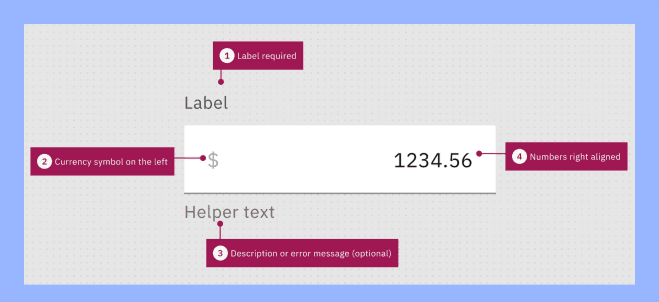
Designers used text and number inputs interchangeably, with no rule for when to use which. Carbon's stepper goes up by 1, which is nearly useless for a $2,400,000 budget. We set clear guidelines for when a value should be a number input and text input to allow flexibility in cases where a number input is not enough to indicate value.

COMPONENT #2: SIDE PANEL
One size fits nothing.
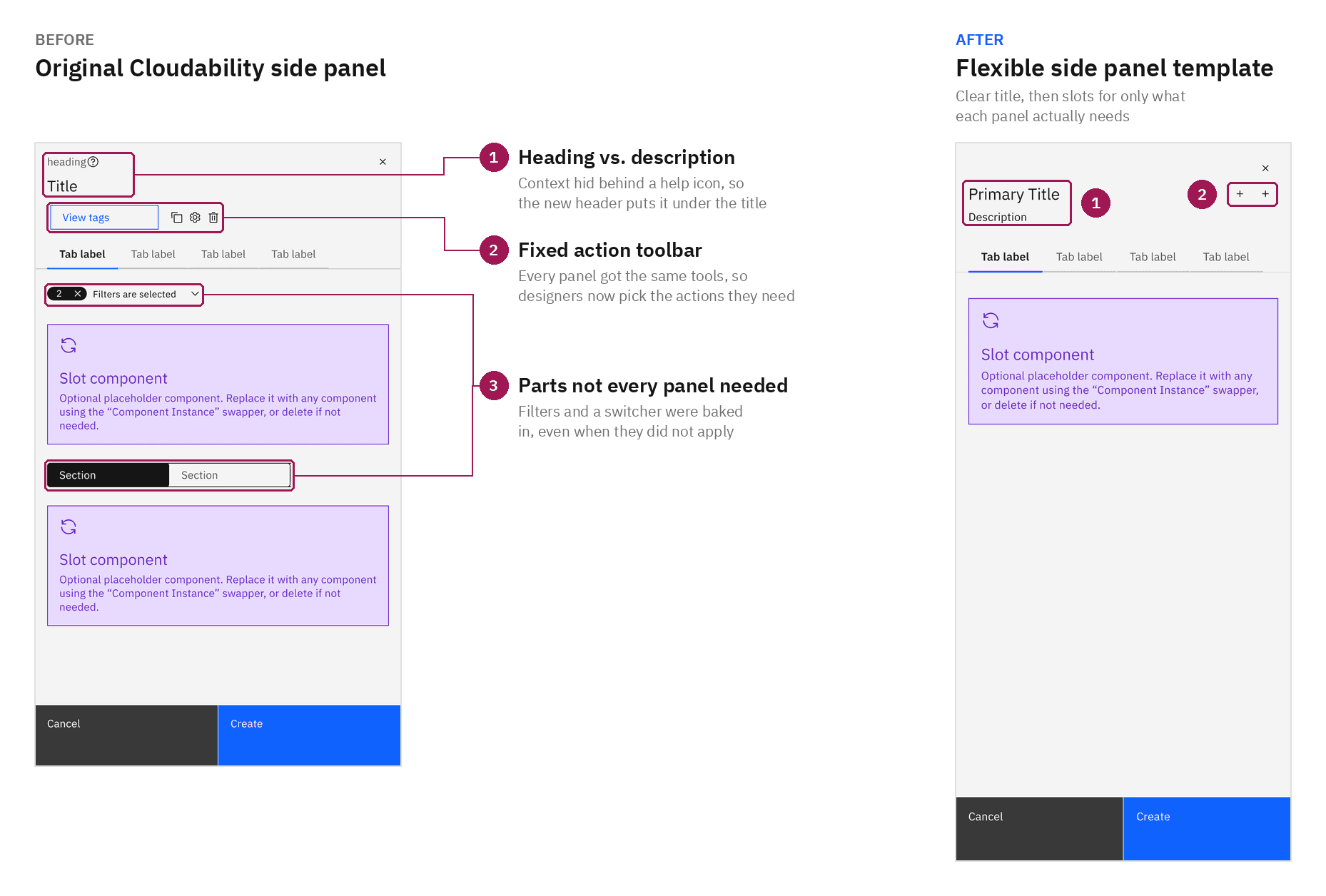
Cloudability uses side panels for everything from quick forms to graphs to full data tables, but only one size existed. We mapped every use, tied panel sizes to content type, defined which components come built in, and set a truncation breakpoint for long descriptions, a constant problem with cloud resource names.

USER TESTING
The template worked in theory. Real Cloudability tasks broke it.
We tested our first iteration of the side panel with 5+ designers and saw problems come up. The raw subtitle was hard to scan and often got cut off. A crowded row of unlabeled icons left people guessing what each one did. Filters and a content switcher were built into every panel, even ones that didn't need them. The new template leads with a clear title and description, then uses slots so each panel includes only what it actually needs.
Concept: Internal Tool to make reading specs more fun, interactive, and engaging.
I noticed most specs weren't being followed, not because people didn't care, but because the small details got lost. Long, dense documentation made it easy to lose focus before the important parts landed. To fix that, I experimented with an internal tool to help people actually adopt these practices, not just read about them.
OUTCOME
700+ instances audited, 52 components mapped, 2 components updated.
We covered 40+ Cloudability screens and handed everything off to engineering, ready to build. The migration is on their roadmap but not in active development yet, so I wrote the handoff to hold up through the wait. Every component comes with usage rules and documented edge cases, so whoever picks it up can build it without me in the room.
AI could help spot the problem, but not fully solve it.
Reading and judging drift across dozens of screens still needed a person, which is what pushed me toward building internal tooling to speed that up. That one's still in progress.
Have a cool idea or a question? Here’s my email:
" transform="translate(5.5 8.5)" width="24.999998488385955px"/></svg>)
Exploring Inconsistencies To Provide Component Guidelines
TIMELINE
May - June 2026
ROLE
Product Designer Intern
STATUS
Handed Off
TEAM
3 Product Designer Interns
2 Senior Product Designers
TOOLS
Figma
Figma Make
Box
Slack
Copilot
Mural
Maze
TIMELINE
May - June 2026
STATUS
Handed Off
TOOLS
Figma
Figma Make
Box
Slack
Copilot
Mural
Maze
ROLE
Product Designer Intern
TEAM
3 Product Designer Interns
2 Senior Product Designers
OVERVIEW
As Cloudability moved onto IBM’s Carbon, the two systems drifted apart across the product. I found where, and wrote the guidance to close it.
Our team of 3 interns audited 700+ component instances and updated 2 components with guidelines Carbon didn’t cover.
CONTEXT
Two teams, two answers, same component.
Designers and developers were both guessing which pattern was correct, and picking differently. Users felt it as a product that didn't quite hang together.
Specs get ignored because the details get lost.
Documentation that runs long loses people before the part that matters lands. Whatever we wrote had to survive being skimmed.
PROBLEM
How might we help designers and developers agree on which pattern is right, without either of them guessing?
SOLUTIONS
Specs built for developers and designers to actually use, not just admire. We broke the process into 3 steps: audit, documentation, and evaluation.
AUDIT
700 instances. 52 components. Swap, fix, or build?
We pulled 40+ screens into Figma and tagged every component against Carbon. Each one landed in a bucket: direct swap, needs changes, or no Carbon equivalent. That last bucket is where the real work was.
DOCUMENTATION
One audit, two readers.
Designers got visual markup in Figma. Developers got a spreadsheet listing each component's page, what's wrong, and the Carbon fix, ready to turn into Jira tickets. Same data, shaped for how each group actually works. We also connected the spreadsheet to the Figma through naming each component picture so developers can also look back.
EVALUATION
Some patterns Carbon never had to think about.
Cloud cost tools deal in huge numbers and dense, layered views. Two patterns kept showing up that Carbon's docs didn't address, so instead of forcing a fit, we designed for them.
COMPONENT #1: TEXT INPUT
Number input vs. text input
Designers used text and number inputs interchangeably, with no rule for when to use which. Carbon's stepper goes up by 1, which is nearly useless for a $2,400,000 budget. We set clear guidelines for when a value should be a number input and text input to allow flexibility in cases where a number input is not enough to indicate value.
COMPONENT #2: SIDE PANEL
One size fits nothing.
Cloudability uses side panels for everything from quick forms to graphs to full data tables, but only one size existed. We mapped every use, tied panel sizes to content type, defined which components come built in, and set a truncation breakpoint for long descriptions, a constant problem with cloud resource names.
USER TESTING
The template worked in theory. Real Cloudability tasks broke it.
We tested our first iteration of the side panel with 5+ designers and saw problems come up. The raw subtitle was hard to scan and often got cut off. A crowded row of unlabeled icons left people guessing what each one did. Filters and a content switcher were built into every panel, even ones that didn't need them. The new template leads with a clear title and description, then uses slots so each panel includes only what it actually needs.
Concept: Internal Tool to make reading specs more fun, interactive, and engaging.
I noticed most specs weren't being followed, not because people didn't care, but because the small details got lost. Long, dense documentation made it easy to lose focus before the important parts landed. To fix that, I experimented with an internal tool to help people actually adopt these practices, not just read about them.
OUTCOME
700+ instances audited, 52 components mapped, 2 components updated.
We covered 40+ Cloudability screens and handed everything off to engineering, ready to build. The migration is on their roadmap but not in active development yet, so I wrote the handoff to hold up through the wait. Every component comes with usage rules and documented edge cases, so whoever picks it up can build it without me in the room.
AI could help spot the problem, but not fully solve it.
Reading and judging drift across dozens of screens still needed a person, which is what pushed me toward building internal tooling to speed that up. That one's still in progress.
Have a cool idea or a question? Here’s my email:
Doodled with love © Jerry Chen 2026